Concept demo built by Lighthouse Voyages. Not the firm's official site.

Graham Injury Firm
Before and after

The current grahaminjuryfirm.com next to the rebuilt version with a 24/7 AI intake assistant. Everything said about the current site below was checked on the live site on 10/08/2026 (desktop and mobile, all 23 pages).

Side by side

Full homepage, same screen sizes

Real full-page screenshots. Scroll inside each frame.

Your site today

grahaminjuryfirm.com · 1440px wide

Current Graham Injury Firm homepage, desktop, full page

Your new site

graham-demo.lighthousevoyages.com · 1440px wide

Rebuilt homepage, desktop, full page

Your site today

grahaminjuryfirm.com · iPhone size (390px)

Current Graham Injury Firm homepage, mobile, full page

Your new site

graham-demo.lighthousevoyages.com · iPhone size (390px)

Rebuilt homepage, mobile, full page

On the rebuilt site the chat is shown minimized here so the full page is visible. On a computer it opens on load; on a phone it waits behind the "Chat with us now" button.

Feature by feature

Your site today vs. your new site

Left: only what we verified on the live site. Right: what the rebuilt site does today.

MomentYour site todayYour new site
Visitor has a question✗No live chat or AI assistant on any page (checked desktop and mobile, after the page fully loaded). The homepage has two FAQs.✓24/7 AI intake assistant with instant answers, in seconds, grounded in the firm's own website: fees, Josiah Graham's background, case results, case types, Florida filing deadlines as general information.
"Start Your Free Case Review"✗Every free case review button scrolls down to the same contact form.✓Opens a conversation that starts with "What happened?" and one-tap buttons for the firm's case types.
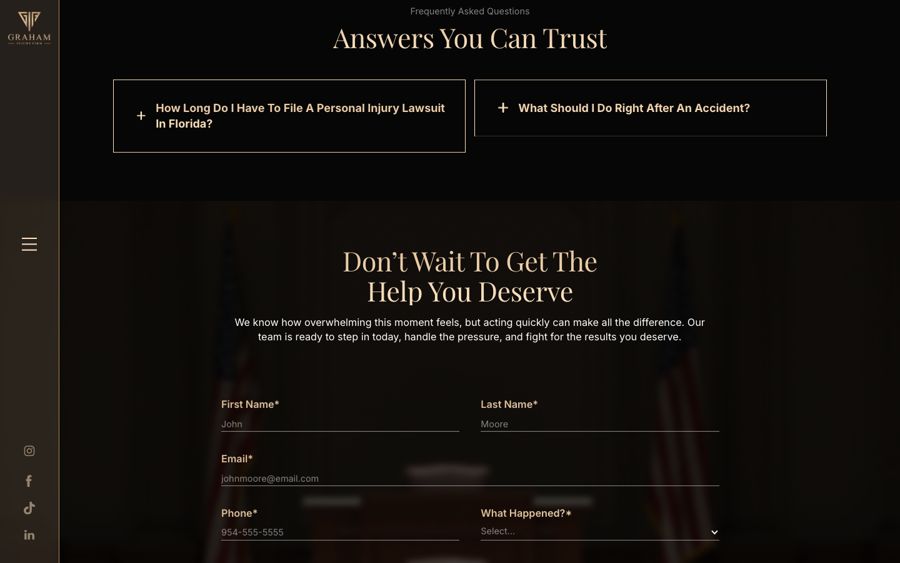
The contact form✗Nine required fields (first name, last name, email, phone, what happened, zip code, state, when it happened, description) plus a checkbox. After sending: "Thank you! Your submission has been received!" and no next step.✓Lead capture in the first few messages: name and phone, asked one at a time. Partial leads are saved even if the visitor leaves. A three-field quick form hands off to the chat.
Call button✗"Call 954-450-4848" and "CALL NOW" are phone links. On a phone they dial. On a computer they open a calling app (FaceTime on a Mac) instead of helping the visitor.✓Tap-to-call still works on phones. On any device the visitor can book a call instead.
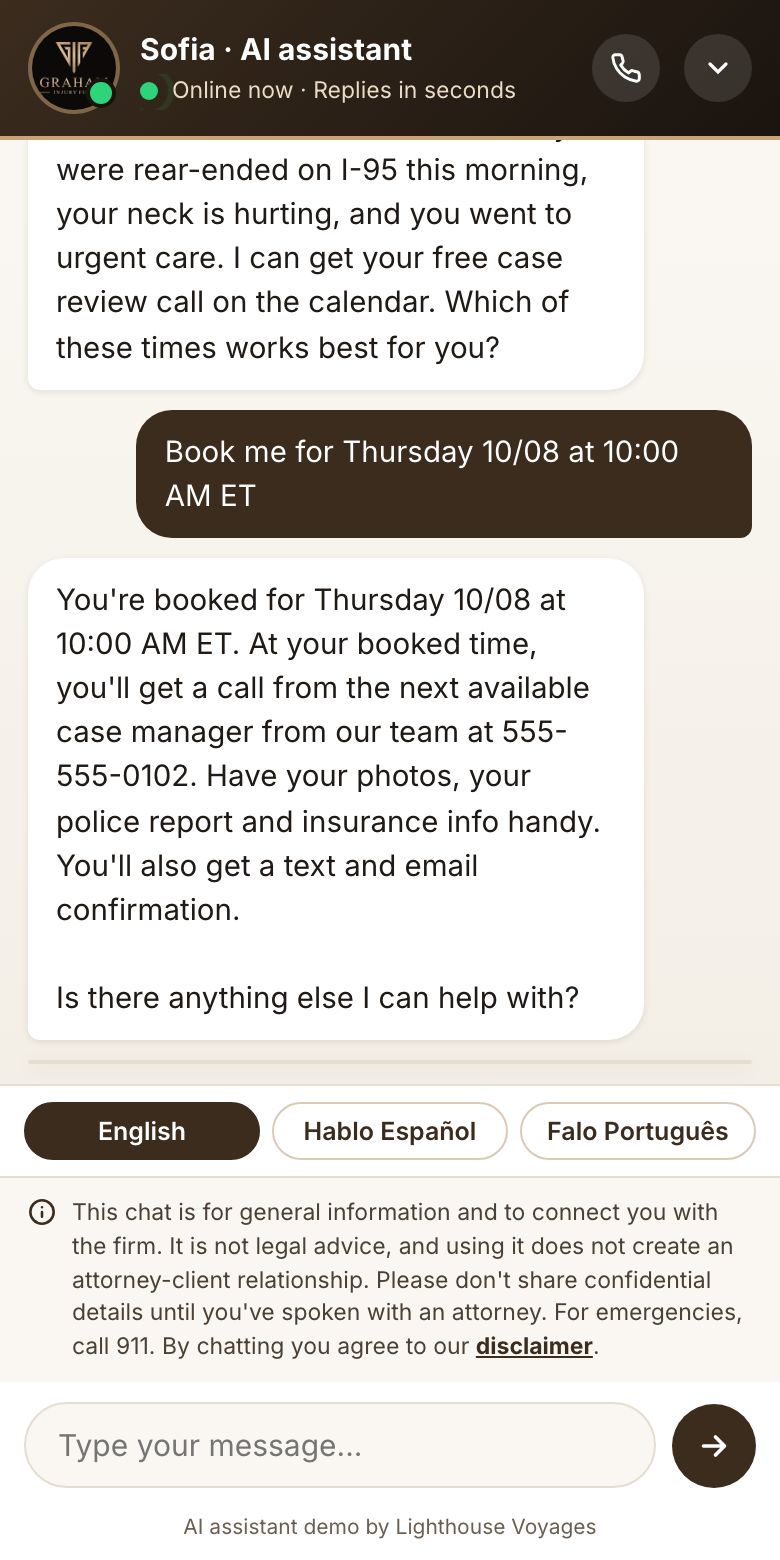
Booking a consultation✗No way to book a time on the site.✓Booking built into the chat: three open times, tap to confirm, then what to expect (a call from the next available case manager at their number, what to have ready, text and email confirmation).
Languages✗English only. No Spanish or Portuguese pages, and no mention of other languages on any page.✓Whole site and chat in English, Spanish and Portuguese, switchable at the top of the page.
Someone at the scene✗Static tips on some practice-area pages (for example "call 911" on the pedestrian and rideshare pages). Nothing on the homepage, and nothing that responds to someone who is at the scene right now.✓Emergency guidance: the assistant asks "happening right now, or already happened?" and gives 911-first instructions plus the firm's number.
Practice-area pages✗On 11 practice-area pages, the "Hire a Lawyer" button links to "#" and nothing happens when it is clicked.✓Every practice area has an "Ask about this" button that starts the chat on that topic.
What the team receives✗A form submission.✓Routing: an English lead card with contact info, case details, booked time and a language flag, assigned to a team member who speaks the visitor's language (demo uses a sample roster).
Legal guardrailsA disclaimer page linked in the footer and on the form.✓Pinned "not legal advice, no attorney-client relationship" notice in the chat. The assistant never says whether someone has a case, never values a case, and never invents firm facts.

Speed is not the issue here: the current homepage loaded in under a second in our test. The gap is what happens after someone lands.

Recorded on the live demo

Booking a call, and switching languages

Unedited screen recordings at real speed. Test details are fake.

Phone: from "car accident" to booked

Quick-pick, accident timing check, name and phone, three call times, confirmed, and the lead card the team receives.

Computer: English to Español to Português, then a Spanish intake

The whole page switches language. The visitor chats in Spanish; the team gets the lead in English with a "speaks Spanish" flag.

The moment that matters

Where a free case review starts today vs. on the new site

Your site today: the contact formCurrent contact form
The start of the nine-field form at the bottom of the homepage.
Your new site: booked in the chatChat confirming a booked call
Booked, confirmed, and handed to the team with the details.

Hours

Listed office hours cover about 28% of the week

The site lists Monday to Friday, 8:00 AM to 5:30 PM.

47.5 hrs

a week the office is listed as open.

120.5 hrs

a week it isn't (nights and weekends). The form is the only option on the site then.

24/7

the AI assistant answers, captures the lead and books the call.

Also fixed in the rebuild

Small things we found

  • The site lists two different main-office addresses: 110 SE 6th Street, Suite 1743 (top menu) and 1 E Broward Blvd, Suite 1200 (contact section). The rebuild shows one; the firm should confirm which is current.
  • "Catastrophic Injury" is spelled "Catastcrophic" in the menu, footer and page address.
  • The homepage shows a "$2.1M settlement for a wife after her husband's death"; the Case Results page lists that case as $2M and a separate $2.1M birth-injury case. The rebuild follows the Case Results page.
Concept demo built by Lighthouse Voyages. Not the firm's official site and not affiliated with or endorsed by Graham Injury Firm. Firm details from grahaminjuryfirm.com. · Rebuilt site